Why Havard Is the Bold Choice You Need for High-Impact Projects
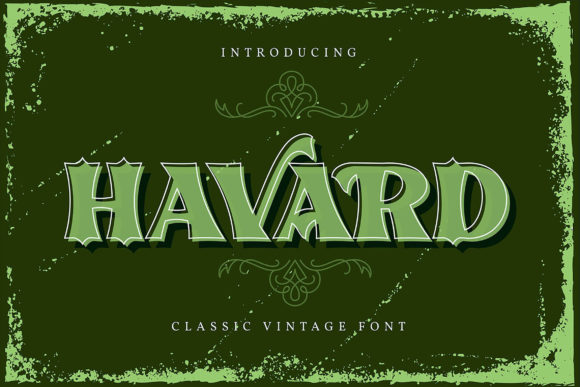
In a digital landscape cluttered with subtle serifs and delicate script fonts, Havard stands out as a statement. It is not merely a typeface; it is a design decision that demands attention. As a bold and thick lettered display font, Havard brings an immediate sense of authority and presence to any project. Whether you are designing a poster, launching a brand identity, or creating a blog header, adding this font confidently can transform a mediocre layout into something memorable. However, the power of such a distinctive typeface comes with specific requirements. Many creators download this font expecting instant success but fail to understand its technical nuances, leading to frustrating results.
The primary allure of Havard lies in its visual weight. It cuts through noise. When used correctly, it guides the user's eye exactly where you want it to go. Yet, there is a common misconception that "bold" simply means "bigger." This is rarely true. A bold font like Havard requires careful spacing and context to remain legible and aesthetically pleasing. If you treat it as a body text replacement without adjustments, your project may suffer from poor readability and a cramped appearance. Understanding the balance between impact and usability is the first step toward mastering this tool.
Decoding the PUA Advantage: More Than Just Standard Characters
One of the most significant features of Havard is its PUA encoding. For those unfamiliar with the term, PUA stands for Private Use Area. This technical detail is often overlooked by beginners who assume a font only contains standard letters. With Havard, PUA encoding unlocks a treasure trove of glyphs and swashes that are not accessible through a standard keyboard. This means you have access to unique decorative elements, alternate characters, and stylistic flourishes that give your work a custom feel.
However, relying on these advanced features without knowing how to access them is a frequent pitfall. Simply typing the alphabet will not reveal the full potential of the font. To utilize the swashes and special glyphs, you must use OpenType features within your design software or employ specific character map tools. Failing to explore these options leaves your design looking flat and generic. If you are investing time in a premium-looking font, you owe it to yourself to extract every ounce of value from its library. Ignoring the PUA aspect means you are using only 20% of what the font offers, which is a waste of resources and creative potential.
Common Pitfalls in Downloading and Installation
Before you even open your design software, you must ensure you have acquired the correct version of Havard. The market is flooded with low-quality repacks and corrupted files that lack the necessary metadata. Using a broken file can lead to missing glyphs, erratic kerning, or crashes in professional applications like Adobe Illustrator or InDesign. Always verify the source of your download. Reputable foundries or trusted marketplaces provide clean, tested files that include all necessary weights and styles.
Another critical mistake involves installation errors. On some operating systems, users attempt to install fonts directly from compressed archives without extracting them first. While some modern OS versions handle this gracefully, it is best practice to unzip the file and install the .ttf or .otf files individually. This ensures that the system recognizes the font family correctly and that all variants (if available) load properly. Skipping this step can result in a situation where you see the font in your list, but the specific styles you need do not appear when you try to apply them.
Context Matters: Where Havard Shines and Where It Fails
Even with perfect installation and knowledge of PUA glyphs, Havard can still be misused if placed in the wrong context. Its bold, thick strokes make it an excellent choice for headlines, logos, and call-to-action buttons. However, applying it to long-form content, such as blog posts or instructional manuals, is a strategic error. The density of the letters makes reading extended text fatiguing. Users may skim over your message because their eyes struggle to track the heavy lines.
- Headlines and Posters: Ideal. The weight grabs attention immediately.
- Logo Design: Excellent. Provides strong brand recognition.
- Body Text: Avoid. Reduces readability and increases cognitive load.
- UI Elements: Use sparingly. Can look overwhelming on small screens.
When evaluating whether Havard fits your project, consider the medium. On mobile devices, the thickness of the letters can cause rendering issues if the screen resolution is low. What looks crisp on a high-resolution monitor might appear jagged or blurry on a smartphone. Always preview your designs on multiple devices before finalizing. This simple check prevents costly rework and ensures your message is communicated clearly across all platforms.
Avoiding the "Too Much" Trap
There is a temptation to use Havard everywhere once you have discovered how powerful it is. You might be tempted to bold every subheading or use it for navigation menus. This approach leads to visual chaos. If everything is loud, nothing stands out. The effectiveness of a bold font relies on contrast. To make Havard pop, you need to surround it with lighter, more neutral typefaces. Pairing Havard with a clean sans-serif or a delicate serif creates a dynamic hierarchy that guides the reader naturally.
Consider the color palette as well. Thick fonts absorb more visual space than thin ones. A black Havard headline on a white background is striking, but the same text in a dark gray might disappear into the page. Conversely, using light colors on top of the thick strokes can create a halo effect that reduces clarity. Test your color combinations rigorously. Ensure there is sufficient contrast to maintain accessibility standards while preserving the intended aesthetic.
Evaluating Your Decision Before You Commit
Before purchasing or downloading Havard, take a moment to audit your current workflow. Do you have the necessary software to support OpenType features? Are you comfortable using character maps to access PUA glyphs? If the answer is no, you may find yourself frustrated. In such cases, it might be better to stick to simpler fonts or invest time in learning the tools required to unlock Havard's potential. There is no shame in choosing a simpler tool if it allows you to produce better work faster.
Furthermore, evaluate the licensing terms carefully. Some display fonts come with restrictions on commercial use, web embedding, or modification. Ignoring these details can lead to legal complications down the line. Ensure that the license covers your specific use case, whether you are building a website, printing merchandise, or creating social media assets. Transparency in licensing builds trust with your clients and protects your business reputation.
Finally, remember that typography is a language. Havard speaks loudly and boldly. Use it to say important things. Do not let the sheer volume of the font drown out your message. By understanding its capabilities, avoiding common installation and usage mistakes, and respecting its limitations, you can leverage Havard to create designs that are not just seen, but felt. The difference between a good design and a great one often lies in these small, deliberate choices. Approach your projects with confidence, respect the craft, and let the boldness of Havard guide your creativity.