Gravity Points: A Minimalist Font for Everyday Creative Projects
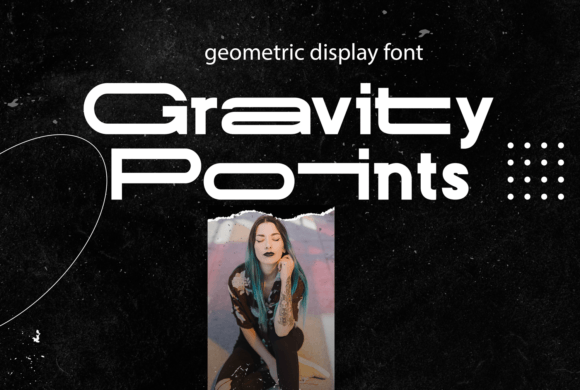
Design often feels like a balancing act. You want something that looks professional, but not sterile. You need clarity, but you also want character. This is where Gravity Points steps in as a surprisingly versatile solution. It is a minimal and neat display font designed to fit seamlessly into an incredibly large set of projects without demanding too much attention from the viewer. Instead of shouting, it whispers with confidence.
If you are a creator, entrepreneur, or marketer looking to elevate your visual communication, adding Gravity Points to your creative toolkit might be the subtle shift your designs have been missing. Its clean lines and structured geometry make it stand out precisely because it doesn’t try to be anything other than what it is: efficient, elegant, and easy to read.
Why Minimalism Matters in Modern Design
We live in an era of information overload. Whether someone is scrolling through social media on their phone or reading a printed brochure at a coffee shop, their attention span is fractured. Complex, ornate fonts can feel heavy or outdated in digital contexts. They require more cognitive effort to process. In contrast, a minimal display font like Gravity Points reduces friction.
When you use a typeface that is neat and uncluttered, you allow the content itself to take center stage. This is particularly important for:
- Headlines and Titles: Where you need immediate impact without visual noise.
- UI Elements: Buttons, navigation bars, and labels that must remain legible at small sizes.
- Brand Identity: Logos and marketing materials that need to look consistent across different mediums.
Gravity Points excels in these areas. Its geometric precision gives it a modern feel, while its simplicity ensures it remains timeless. It doesn’t date quickly, which is a huge benefit for businesses that want their branding to stay relevant for years rather than months.
Real-World Applications Across Different Industries
One of the strongest arguments for using Gravity Points is its adaptability. It isn’t limited to just one niche. Here is how different users can apply this font in real-world scenarios.
For Freelancers and Small Business Owners
If you run a small business, whether it’s a boutique consulting firm, a local bakery, or a freelance photography studio, your visual identity is often your first point of contact with clients. You likely don’t have a massive budget for custom typography. Using a pre-designed, high-quality font like Gravity Points allows you to maintain a premium look without the premium price tag.
Imagine creating an invoice template. Most invoices are boring, dry documents. But by using Gravity Points for the header and key figures, you add a layer of sophistication that suggests reliability and attention to detail. Similarly, for a freelancer building a portfolio website, this font can help structure case studies in a way that feels organized and trustworthy. The neatness of the font mirrors the organization of your work.
For Educators and Content Creators
Educators and bloggers often struggle with making dense information digestible. When you are explaining complex concepts, the typography should recede into the background, allowing the text to flow smoothly. Gravity Points works well for pull quotes, section headers, or even body text in short-form content.
Consider a blogger writing about productivity tools. Using Gravity Points for the main headings creates a clear hierarchy. Readers can scan the article quickly, identifying key points without getting lost in decorative flourishes. For educators creating slide decks or handouts, the font’s clarity ensures that students or colleagues can read the material easily, reducing eye strain during long presentations.
For Marketers and Publishers
In marketing, every pixel counts. Advertisements, especially those on mobile devices, have very limited space. Ornate fonts can become illegible when scaled down. Gravity Points, being a display font with strong structural integrity, maintains its readability even at smaller sizes. This makes it ideal for:
- Social Media Graphics: Instagram posts or LinkedIn banners where text overlays images.
- Email Newsletters: Subject lines and call-to-action buttons that need to pop.
- Print Collateral: Flyers, business cards, and packaging where space is tight.
The font’s ability to match an "incredibly large set of projects" means marketers can use the same typeface across a multi-channel campaign, ensuring brand consistency from email to print.
The Technical Advantage: PUA Encoding
While the aesthetic appeal of Gravity Points is obvious, its technical implementation offers a practical advantage that many designers appreciate. Gravity Points is PUA encoded. What does this mean for you?
PUA stands for Private Use Area. In simpler terms, it means that all the special glyphs, swashes, and alternate characters are mapped to specific keys on your keyboard or accessible via a simple menu in your design software. You don’t need to hunt through complex ligature menus or worry about compatibility issues with older software versions.
This ease of access is crucial for speed. When you are working against a deadline, you don’t want to spend ten minutes figuring out how to insert a specific stylistic alternation. With PUA encoding, you can access these unique features instantly. This encourages experimentation. You might try a standard headline, then quickly swap in a swash variant to see if it adds the right amount of flair. This flexibility allows you to tailor the font to the specific mood of the project without technical hurdles.
Practical Example: Swashes and Stylistic Sets
Let’s say you are designing a logo for a tech startup. You might start with the basic letters of "Gravity Points." Then, realizing the design feels too rigid, you use the PUA-encoded swashes to add a slight curve or connection between two letters. The result is a custom-looking logo that still retains the clean, minimalist essence of the base font. Without easy access to these features, you might have stuck with the plain version, potentially missing an opportunity to create a more distinctive brand mark.
What to Consider Before Using Gravity Points
Like any tool, Gravity Points has its best use cases and some limitations. Being aware of these will help you get the most out of it.
Pairing with Other Fonts
Because Gravity Points is a display font, it has a strong personality. While it is neutral enough to blend in, it is not invisible. When pairing it with other typefaces, choose a complementary sans-serif or serif for body text. Avoid pairing it with another display font, as this can create visual competition. A simple, clean sans-serif like Helvetica or Arial often pairs well, allowing Gravity Points to shine as the accent.
Readability at Scale
While Gravity Points is highly legible, it is designed primarily for display purposes. Using it for long paragraphs of body text can become fatiguing for the reader. Reserve it for headlines, subheads, captions, and short blocks of text. If you need to write a 2,000-word article, let a dedicated body font handle the heavy lifting, and use Gravity Points to break up the sections.
Licensing and Usage Rights
Before downloading or purchasing Gravity Points, always check the licensing agreement. Are you using it for personal projects, commercial products, or client work? Some fonts have restrictions on embedding in web pages or apps. Understanding these terms protects you from legal issues and ensures you are using the font ethically and legally.
Final Thoughts on Adding Gravity Points to Your Workflow
Gravity Points is not just another font; it is a strategic choice for anyone who values clarity and efficiency. Its minimal design speaks to a modern sensibility that prioritizes user experience and visual harmony. Whether you are designing a wedding invitation, a corporate report, or a mobile app interface, this font offers a reliable foundation.
The combination of its aesthetic neutrality and technical convenience (via PUA encoding) makes it a low-risk, high-reward addition to your design resources. It allows you to focus less on the mechanics of typography and more on the message you are trying to convey. So, next time you start a new project, consider giving Gravity Points a try. You might find that its quiet confidence is exactly what your design needs to stand out.